Showing posts with label android root. Show all posts

Wednesday, June 12, 2013

How to root the Samsung Galaxy S4 (GT I9500)?

Samsung-Galaxy-S4-with-tree-roots-coming-out-of-it's-back

So, you've just indulged your gadgetry cravings and got yourself a gorgeous new Samsung Galaxy S4. An adorable electronic apparatus, wouldn't you say so? You know find yourself in the peculiar situation of caressing its smooth curves, staring at its splendid Super AMOLED screen and trying to figure out how could someone possibly take full advantage of  its insanely powerful processor. 


But... maybe you demand more! For instance, maybe you want even more processing power from that octa core beast and you decide that you need to overclock it. Maybe TouchWiz ( Samsung property user interface) isn't your cup of tea or maybe you  hate the amount of bloatware that comes with your new Samsung Galaxy S4.  If this is the case, you should take in consideration the fact that there is a way to gain more control over your Samsung Galaxy S4  and in Android terms this can only mean one think: rooting.

Black-Samsung-Galaxy-S4-smartphone-presented-from-different-angles
Samsung Galaxy S4


A reminder:  tampering with your smartphone's firmware, like we gonna do, can have negative consequences. There is a minor risk  that you could end up with an unresponsive handset  and you will void your warranty. You have been warned! On a more calm note, all the modification that you do to your phone, like rooting, can easily be undone and your warranty will be valid once again.

And without further ado, I would like to introduce the steps that you need to take to successfully root your brand new and shiny Samsung Galaxy S4.

1. First things first: pre-requisitions

White-Samsung-Galaxy-S4-smartphone-presented-from-aside

2. Prepare your smartphone

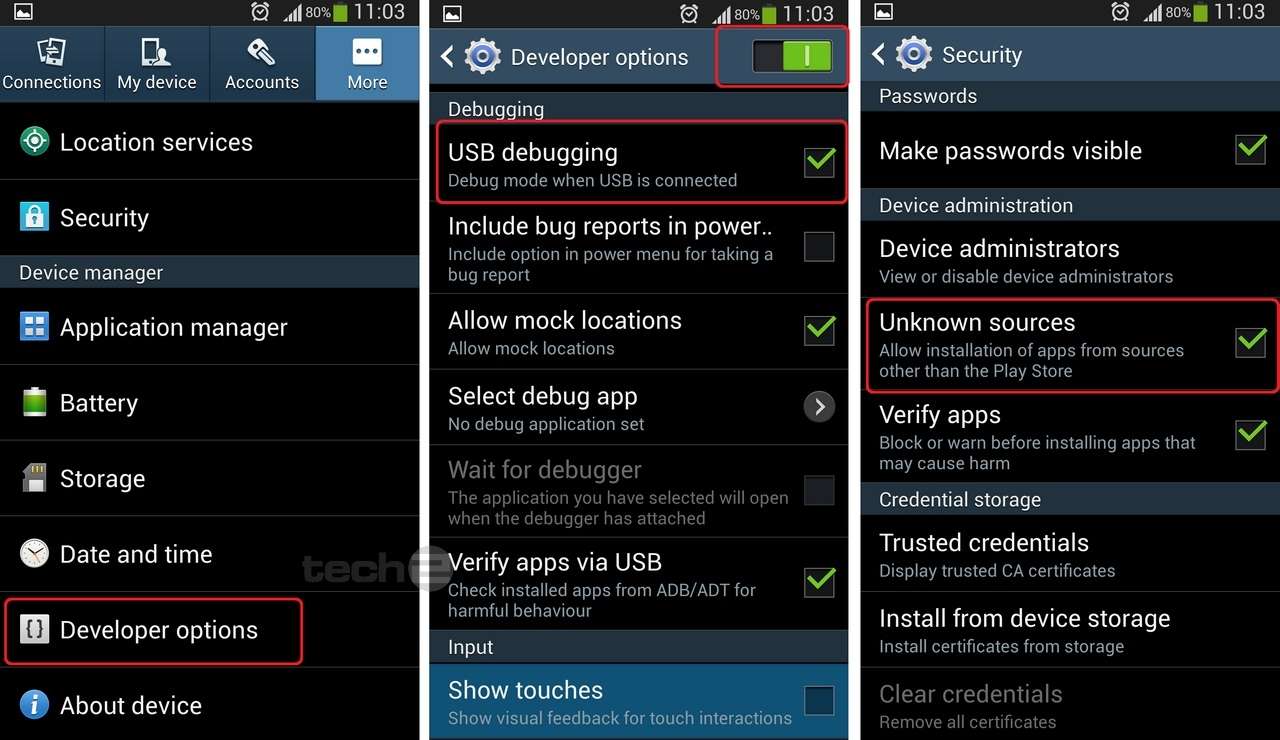
Steps-in-the-menu-for-enabling-USB-debugging-on-Samsung-Galaxy-S4
Enabling USB debugging mode on Samsung galaxy S4

  • go in to Settings/More/About device and scroll down until you reach Build Number 
  • now, tap fast&repeatedly the Build Number until it says you are a developer(wow, that was easy!)
  • go back to Settings/Developer Options and turn ON USB Debugging like in the picture above
  • it is safe now to do a full backup of your phone by installing Rom Manager from Play

3. Rooting Samsung Galaxy S4
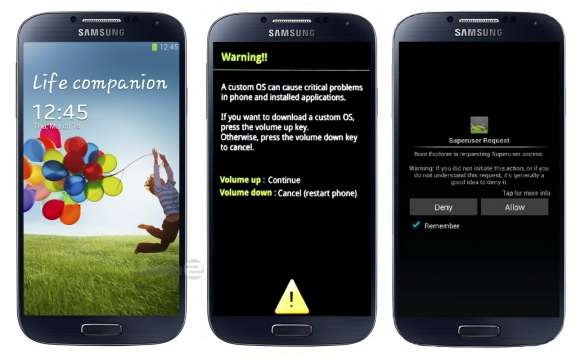
Rooting Samsung Galaxy S4
  • power off your Galaxy S4 and boot the device into Download Mode. To do this you will have to press and hold Volume Down, Home and Power buttons in the same time until the Android robot and a triangle appears on the screen 
  • press the Power button again to continue and be able to enter Download Mode. 
  • once in Download Mode, execute Odin 3.07 on your computer and then connect Galaxy S4 to the PC using USB cable. You have to wait until Odin detects the device.
  • after Odin detected your device, in Odin, click the PDA button and select  CF-Auto-Root-ja3g-ja3gxx-gti9500.zip file.
  • make sure that  Auto Reboot and F.Reset Time checkboxes are selected in Odin. 
  • uncheck the Re-Partition option and  click the Start button in Odin. 
  • the installation process will begin now and it should be over in a few minutes. After the installation process is finished, the smartphone will reboot into Recovery Mode and will automatically install the root package. 
  • and that's it, you are done Sir! You have just successfully rooted your Samsung Galaxy S4

I advice you to wait for the 4.2.2 Jelly Bean updates for your Galaxy S4 that will be provided by Samsung in the next couple of weeks and only than apply the rooting procedures presented above. Why? Because after you have rooted your phone you will not be able to get official Samsung Galaxy S4 updates OTA (over the air). And one final disclaimer:  I am not to be hold responsible if you brick or damage in any way your phone. Root on your own risk  the general guidelines that i have provided are just that, general guidelines.


By Aleman Adrian

Thursday, June 6, 2013

What is Root and why should you do it (or not)?

close-picture-of-the-screen-of-an-android-smartphone-with-green-text

Would you like to have more control over your smartphone? Is your technical mojo fully charged? Are you in the mood for something new and exciting?If the answer is yes than you should go ahead and definitely root you smartphone.

But first  you should read and understand about what you are going to do and follow the instruction to the letter. The most important thing here is to be careful. Do a backup of your data and be sure that you have all the tools that you need for rooting your phone before you begin. The risks that you take when rooting your android smartphone are minimal and the potential benefits are pretty impressive. But let's not go ahead of ourselves, first things first:


What is Root?

a-chalk-table-with-text-written-on-it

You don’t get root access to your Android device straight outta the box and several applications won’t function without you having root access to your investment. To make things easier to understand i'll make use of an analogy. If you have interacted with a Windows PC in the past, chances are that you had administrative rights and you could have altered and tune the operating system in any way that you wanted to. Rooting your Android smartphone is equivalent to having administrative privileges on Windows. In our case, this means having access to the entire Android operating system and getting around any restrictions or limitations that your smartphone manufacturer may have implemented. This is basically what happens when you proceed with the rooting of your Android smartphone.

Should i root my smartphone?

a-bag-with-a-rooted-android-logo-surrounded-by-icons-of-root-only-applications

With great power comes great...fun! If you ask for my personal opinion i would advice you to go down the root way. Why? Here are some of the immediate benefits of rooting your phone: 
  • You can download an run much more applications
  • Gain full control over your android smartphone
  • You can customize and theme your device in any way you want to
  • Improve your battery life
  • Free up internal storage
  • Back up and restore the whole system
There are also less obvious advantages of having your Android smartphone rooted but this advantages are the ones that should matter the most in your decision to root your Android smartphone. Here you will find listed some of them:
  • Rid your phone of all manufacturer's or carrier bloatware (software that you don't really need)
  • Access your entire file system
  • Set up wireless tethering
  • Completely block advertisements
  • Flash custom ROM's (install modified Android ROM which can add extra useful features to your phone; you can find more on this in other dedicated posts on this blog)
  • Speed up your phone by overclocking the CPU

What are the risks of rooting my smartphone?

a-yellow-triangle-with-android-logo-working-with-a-shovel

Before you proceed with the rooting of your Android device you should take in consideration the risks that come  with this procedure. There are three main concern factors:
  1. Voiding phone warranty: if you root your phone you will most likely loose your manufacturer or carrier warranty. Imagine this scenario: after you have successfully rooted your phone something goes wrong with your touchscreen or battery. In these case you will not be able to take full benefit from you warranty. But remember this, your phone can be very  easy un-rooted and you can than install the original firmware of your phone and your warranty will be valid once again.
  2. Bricking your smartphone: there is a minor risk that you will end up with a phone useful to you as a brick. This could happen only if you don't follow the necessary steps in rooting your phone or if you flash a ROM that wasn't designed for your device. If you do your homework before trying to root your phone, follow the right steps and pay attention to what you are doing the possibility of bricking your phone should be almost nonexistent.
  3. Security and Malware risk. You could be confronted with some security risk after you have rooted your phone depending on what applications you install. 

To root or not to root, this could be a question.


a-skull-and- bones-representation-with-a-text-hat-says-keep-calm-and-root-your-androidIf you enjoy being able to tinker with all of your phones settings, discover new ones by installing custom ROM's or you like to customize every single inch of your smartphone screen by installing countless themes - than rooting is the answer for you. Other potential benefits that come from rooting your phone like -overclocking your CPU, improved battery life, eradicating the bloatware, root-only applications, improved general performance - could only cement your decision to root your phone and you’re most likely to find the hole process of rooting extremly rewarding.


Depending on your willingness to experiment with new things and your technical proficiency , rooting your phone should be a straightforward process. If not one of the above benefits intrigues you, rooting your android phone probably isn’t for you.


By Aleman Adrian